Share your Mouse, Keyboard, Windows, Clipboard and file transfers with other computers such as your old laptop with KVMShare Pro. This program offers a seamless transition of the mouse cursor between computers, as well as keyboard input and clipboard data following the mouse focus. With a simple hotkey, you can move one window to the next screen and connect up to three computers.
Share your Mouse, Keyboard, Windows, Clipboard and file transfers with other computers like your old laptop. Real KVM actually makes you share the screen of your other computer and has much higher data transfer rates than similar programs.
The mouse cursor moves seamless from one computer to the other, keyboard input follows the mouse focus and clipboard data will follow as well. With a simple hotkey you can move one window to the next screen.
Connecting 2 or 3 computers.
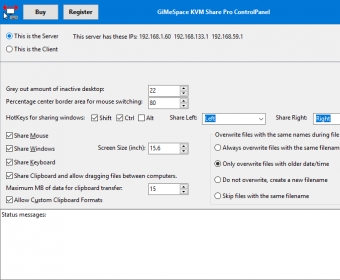
First you need to assign a server role to one computer and a client role to the others.
Moving the mouse between the computers.
Now you need to specify on which side each computer is so you can smoothly move the mouse cursor between the 2 or 3 screens. To avoid accidentally moving the cursor to the other screen only the centre of the left and right border acts as a portal to the other screen, you can specify how big this area is.
To make it obvious on which computer you are working the inactive screen can be greyed out. The amount of grey you can also specify. Also the keyboard input will follow where the mouse is. more






Comments